
Every game gets its cover.
Point BoxArt at the SD card from your handheld. It works out what each game is, finds its box art, and saves it where your frontend looks for it.
Free and open source. macOS 14 or later, on Apple silicon.
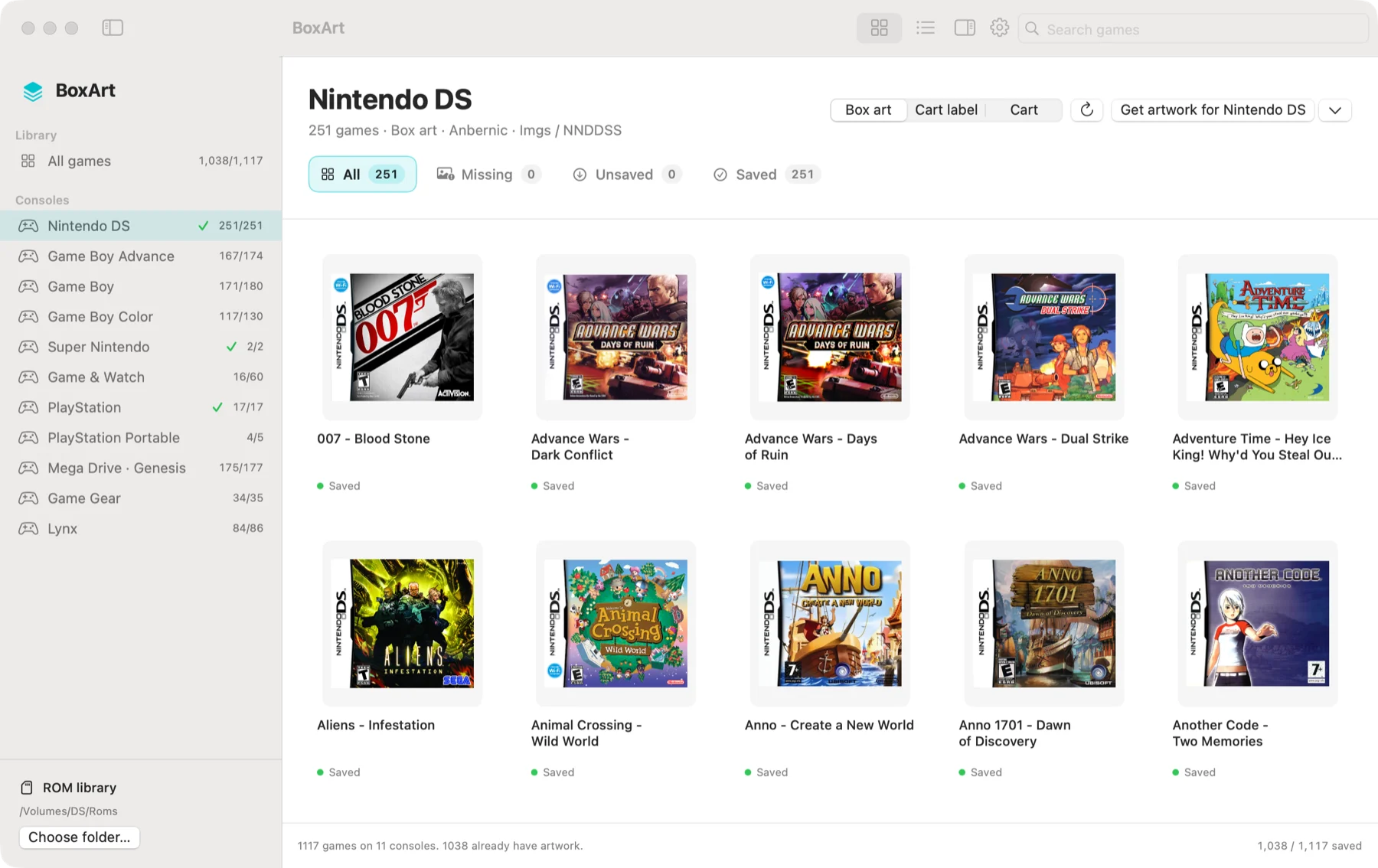
- 1,117games on one handheld’s card
- 11consoles found by their folders
- 1,038now have a cover
The card in the screenshot. The 79 without a cover are homebrew, ROM hacks, and Game & Watch games nobody has scanned a box for.
One button
Do one console, or just the games you picked
The main button always says what it is about to do. Choose a console, several, or a handful of games, and it narrows to match. With nothing chosen it does the whole card.
- Get artwork for Game Boy
Click a console in the sidebar to work through that one alone.
- Get artwork for 3 consoles
Command-click more consoles to take several at once.
- Get artwork for 12 selected games
Select covers in the grid, with Shift for a range, to do just those.
Matching
How it finds the right cover
ROM collections are a mess of scene names, translations and files someone renamed years ago. BoxArt tries four things, most certain first, and tells you which one found each cover.
-
The exact filename
A ROM named the way the No-Intro and Redump sets name it has a cover under the same name. Most games stop here.
-
The game code
Nintendo DS ROMs carry a four-letter code in their header. BoxArt reads it and asks GameTDB for that exact release, so a renamed or translated DS game still gets its own cover.
-
The ROM’s checksum
An unmodified cartridge dump is identified by its contents, whatever the file is called. Zipped ROMs use the checksum the archive already stores, so nothing is unpacked.
-
The same title
Region, revision, language and translation tags are set aside, along with scene-release clutter. Among several releases of that title, the ROM’s own region wins, then USA, World, Europe and Japan.
It never guesses a different game. The title has to be the same once punctuation and tags are set aside. Mega Man 4 with no cover of its own gets nothing, not the cover of Mega Man 3.
54 systems
It knows your folders
BoxArt reads the folder names that Anbernic firmware, dslot, muOS, Knulli and EmulationStation use, such as GBA, SFC, MD and SEGACD, so a zip or disc image is filed under the right console without being opened.
Nintendo
- DS
- Game Boy
- Game Boy Color
- Game Boy Advance
- NES
- Famicom Disk System
- Super Nintendo
- Nintendo 64
- Virtual Boy
- Pokémon Mini
- Game & Watch
Sega
- Mega Drive · Genesis
- Master System
- Game Gear
- SG-1000
- Mega-CD
- 32X
- Saturn
- Dreamcast
- Naomi
- Atomiswave
Sony
- PlayStation
- PSP
NEC · SNK · Bandai
- PC Engine
- PC Engine CD
- SuperGrafx
- Neo Geo
- Neo Geo CD
- Neo Geo Pocket
- Neo Geo Pocket Color
- WonderSwan
- WonderSwan Color
Atari
- 2600
- 5200
- 7800
- 8-bit
- ST
- Lynx
- Jaguar
Arcade
- FinalBurn Neo
- MAME
Computers and more
- Amiga
- Commodore 64
- VIC-20
- MSX
- MSX2
- DOS
- ScummVM
- ZX Spectrum
- Amstrad CPC
- ColecoVision
- Intellivision
- Vectrex
- Supervision
Arcade sets named by short code, like mslug.zip, are looked up by their real titles. Multi-disc games count once, by their playlist. Artwork, save and port folders are left out, so nothing that is not a game shows up as one.
Export
Saved where your frontend looks
Pick a profile once. Covers are resized to fit, never stretched, and written straight to the card.
| Profile | Where covers go | Notes |
|---|---|---|
| Anbernic · NNDDSS | Imgs/<ROM name>.png beside each ROM | The layout the RG DS Plus and dslot read. PNG, up to 512 px by default. |
| RetroArch | <system>/Named_Boxarts/<label>.png | Import your .lpl playlists and covers are named by their exact labels. |
| TWiLight Menu++ | _nds/TWiLightMenu/boxart/<ROM filename>.png | Fitted within 128 × 115 for the DS menu. |
| Custom folder | Any folder you choose | PNG or JPEG at the size you set, for other frontends. |
Careful with your card.
- ROMs are only read, and only as far as BoxArt needs to identify them. Their contents are never changed.
- A cover you already have is never overwritten. If a match is wrong, move it to the Trash from the right-click menu and import your own.
- Each cover is saved the moment it is found, so stopping halfway, or pulling the card, keeps everything done so far.
- No account and no tracking. The only requests BoxArt makes are for cover names and images, from Libretro’s collection on GitHub and from GameTDB.
Questions?
A console that is not recognised, or a game that got the wrong cover? Get in touch, or open an issue.
support@xenocode.co.jpInclude your macOS version, the BoxArt version, the name of the folder the game is in, and the file’s name. Issues on GitHub work too.
Does BoxArt download games?
No. It contains no games and fetches none. It only adds cover images for games already on your card.
Why did a game not get a cover?
Usually because nobody has scanned one: homebrew, ROM hacks and unreleased prototypes often have none. Select the game to see what was tried, then use Import Image to add your own, or Search Images Online to find one.
Will it rename my ROMs?
Not unless you ask. A setting, off by default, renames ROMs to their standard names as covers are found. It skips anything ambiguous and keeps a log of every rename beside the ROMs.
Can it get cart labels as well as boxes?
For Nintendo DS, yes: switch from Box art to Cart label or Cart at the top of the window. They are saved in their own folders beside the box art.
Does it run on Intel Macs?
The download is built for Apple silicon only. BoxArt is open source, so the source is there to build yourself, but it has not been tested on Intel.